
Introduction
A cracked iPhone screen is one of the most common problems homeowners and everyday users deal with. Whether the phone slipped off the counter, dropped on the driveway, or cracked inside a pocket, the damage often happens instantly—and usually at the worst time. The good news is that screen replacement is a well-understood repair, and with the right information, you can decide the best way to get your iPhone working again.
If you live in Markham, ON, you have access to reliable repair options, but knowing what type of damage you have, what repair you actually need, and how long the process takes helps you make the right choice. After working with many screen replacements over the years, I’ve seen the biggest mistakes people make and what leads to smooth, successful repairs. This guide will walk you through everything you need to know—from diagnosis to repair options to post-repair care.
Understanding iPhone Screen Damage
A cracked screen isn’t always just a cosmetic issue. Depending on the severity, you may notice:
- Fine surface cracks that don’t affect performance
- Shattered glass but the display still works
- Touchscreen not responding
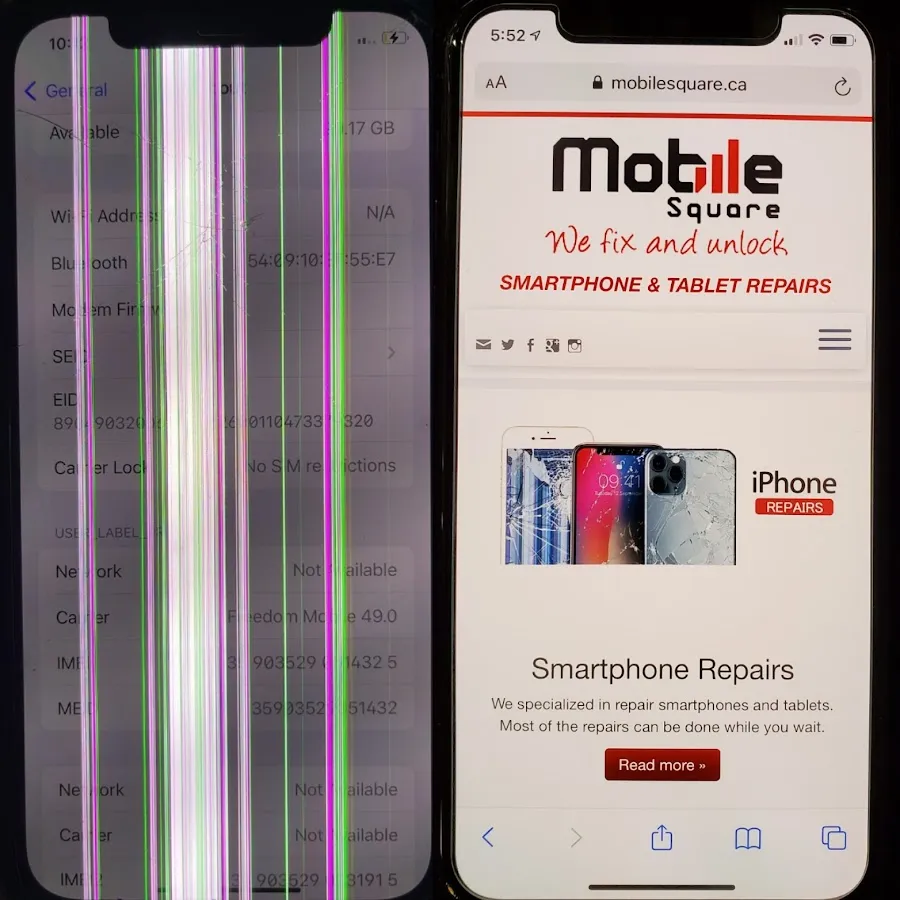
- Black spots, lines, or “bleeding” on the screen
- A completely black or flickering display
These symptoms help determine whether you need glass-only replacement or a full screen assembly replacement, which includes the display, touch layer, and glass.
Most modern iPhones (especially iPhone X and newer) use OLED or high-end LCD displays wrapped tightly to the glass. That means even small cracks can lead to display failure over time.
Common Causes of Screen Cracks
Even though the cause seems obvious—a drop—there are hidden factors that make screens crack easier.
- Impact from a hard surface: Driveways, tile floors, and curbs are the most common culprits because they concentrate force on small points.
- Pressure inside a pocket or bag: Sitting, bending, or placing weight on the phone can produce spider cracks even without dropping it.
- Temperature stress: Exposure to extreme cold in Ontario winters (especially in Markham) can make glass more brittle.
- Weak or low-quality screen protectors: A thin or poorly installed protector may not absorb the shock needed to keep the display safe.
Pro Tip: If a crack appears without an obvious drop, the digitizer or frame may already have been weakened from earlier impacts.
What Type of Screen Replacement Do You Need?
The repair required depends on how your screen behaves.
If the screen still works normally
You likely need glass replacement or a standard screen assembly replacement.
If the touch is unresponsive
This means digitizer damage. You’ll need a full screen assembly.
If the display is black, has lines, or flickers
This points to OLED/LCD failure, requiring a full display replacement.
If the phone bends or frame is damaged
The housing might need straightening before the new screen is installed, or the screen may crack again soon after.
Table: Understanding Screen Problems and Their Fixes
| Damage Type | Symptoms | Required Fix | Can You Still Use Device? |
|---|---|---|---|
| Minor crack | Hairline crack, no touch issues | Glass/screen replacement | Yes, short-term |
| Shattered glass | Many cracks, glass flakes | Full screen assembly | Yes, but risky |
| Touch failure | No touch response, ghost touches | Full assembly replacement | Limited use |
| Display failure | Black spots, lines, no display | Full assembly replacement | No |
| Bent frame | Warped edges, uneven screen | Frame adjustment + screen | Not recommended |
Professional vs. DIY: What’s the Better Choice?
You will find many DIY kits online, but screen replacement for newer iPhones is delicate. Replacing glue seals, transferring Face ID components, and ensuring no dust enters the display requires professional tools.
DIY Risks
- Permanent Face ID damage
- Lost water-resistance
- Dust under the screen
- Ribbon cable damage
- Incorrect adhesive use
- Cheap parts that fail fast
Professional Repair Benefits
Screen damage isn’t limited to iPhones. If you’re also dealing with a cracked or unresponsive tablet, professional iPad Repair services can restore display clarity, touch accuracy, and overall performance without replacing the entire device.
- Fast turnaround (often under an hour)
- OEM-quality or high-grade replacement parts
- Proper seals and adhesives
- Warranty on parts and labor
- Safe handling of Face ID and sensors
Pro Tip: If your phone is iPhone X or newer, always avoid DIY unless you have precision tools and experience with OLED displays.
Cost Factors in Markham, ON
Prices vary depending on:
- iPhone model (newer models use advanced OLED screens)
- Type of replacement (aftermarket vs. premium vs. OEM pulled)
- Whether frame straightening is needed
- Technician experience
- Warranty coverage
You don’t need the cheapest repair—you need the most reliable repair. A poorly installed screen can lead to touch issues, display tint, or premature failure.
According to mayoclinic.org, damaged phone screens can expose users to sharp glass edges and potential safety risks if left unrepaired.
If your iPhone is older and the repair cost feels close to the phone’s value, replacing the device may be the smarter option. Many customers in Markham choose to upgrade instead of repairing heavily damaged phones. You can explore available options on our Phones for Sale page to compare refurbished and unlocked devices.
How Long Does Screen Replacement Take?
In most Markham repair shops—especially experienced ones—screen replacement usually takes:
- 30–60 minutes for standard models
- 60–90 minutes for newer, more complex designs
- Longer if frame straightening is required
Shops that stock common models can do same-day service.
What to Consider Before Repairing Your Screen
Before choosing a repair shop or deciding on a replacement, ask yourself:
How important is Face ID to you?
It must be handled carefully and transferred correctly.
Do you need the phone to stay water-resistant?
Only experienced shops restore proper sealing.
Do you want original-quality display colors?
OLEDs vary in quality—ask for high-grade or OEM options.
Will you keep the phone long-term?
Higher-quality parts make more sense if you plan to keep it.
Common Mistakes People Make
Sometimes a cracked screen isn’t the only issue affecting your phone’s performance. If your device drains quickly, overheats, or shuts down unexpectedly after a drop, the battery may also be compromised. This guide on Signs You Need a Samsung Battery Replacement explains common symptoms, risks of delaying repair, and when replacement becomes necessary.
- Waiting too long to repair — cracks spread and affect the display
- Using low-grade screens that dim easily
- Trying to fix the phone with cheap DIY kits
- Ignoring frame damage
- Continuing to use a cracked screen that sheds glass
These mistakes often increase repair costs later.
Key Questions Readers Ask
Can I still use my iPhone with a cracked screen?
You can, but you shouldn’t for long. Small cracks often grow and lead to digitizer or display failure. Glass splinters can also cause injury.
Will screen replacement affect Face ID?
Not if done properly. The Face ID module transfers from your old display to the new one. Damage occurs only when handled incorrectly, which is why experienced technicians are important.
Are aftermarket screens okay to use?
High-grade aftermarket OLEDs are often good alternatives to expensive OEM screens. Just avoid ultra-cheap copies—they’re dim, fragile, and inconsistent.
How do I know if the screen is original quality?
Ask the shop about part grade and look for:
- Bright colors
- Good brightness levels
- No tint
- Smooth touch response
A good shop will let you test the screen before finalizing.
Conclusion
A cracked iPhone screen doesn’t have to be stressful. Once you understand the damage type and repair options, you can choose the safest and most reliable solution. If you’re in Markham, ON and need help diagnosing or replacing a cracked screen, Mobile Square – We Fix and Unlock can assist with professional diagnostics and quality screen replacements.
Contact: info@mobilesquare.ca | 1-647-970-9700
A high-quality repair not only restores your phone but also extends its lifespan—making it a smart investment for any iPhone user.