
Is your iPad dying in the middle of a movie or schoolwork? When your iPad Battery Dies Fast, it is usually due to heavy background app activity, high screen brightness, or a physically degraded battery cell. We help you identify the direct cause of these issues so you can regain your device’s reliable performance.
Mobile Square has diagnosed and repaired thousands of iOS devices. This guide covers why these power drains happen and how to address them effectively.
Why Tablet Batteries Lose Power Over Time
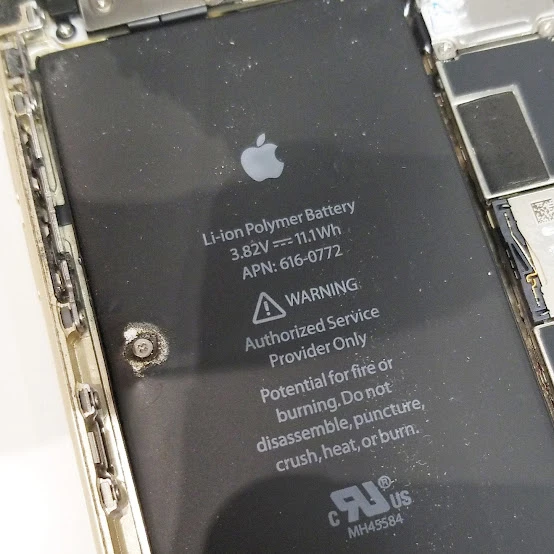
Every time you charge and discharge your tablet, physical wear occurs within the battery cell. Over time, active materials inside the lithium-ion polymer battery degrade, increasing internal resistance. This means the cell cannot hold as much charge as it did when it was brand new.
According to the official Apple Support documentation, iPad batteries are built to retain 80 percent of their original capacity after 1,000 complete charge cycles. If you charge your device daily, you will likely hit this limit in about three years.
Once your device surpasses this cycle count, you will notice significant iPad Battery Problems. This is the hardware’s natural lifespan, and chemical decay is completely normal for these devices.
Bonus Tip: Avoid charging your iPad to 100 percent when it is sitting in a hot environment, as heat combined with full capacity accelerates battery wear.
What Causes Rapid Power Drain in Daily Use
Apart from hardware aging, software settings often consume power quickly. Bright displays, push notifications, and background data synchronization strain the system. If your screen brightness is constantly set to maximum, the backlight draws continuous current.
Background tasks run quietly even when your tablet screen is turned off. Apps like social media or email client tools continuously fetch new data from online servers. This constant network activity prevents your processor from entering a low-power sleep state.
To address this, you can implement changes to fix iPad Battery Drain manually. Disabling background app refresh prevents apps from downloading data when you are not using them. You can find this option under the General Settings menu.
Limiting location services also reduces the load on your wireless antennas. When multiple apps constantly check your GPS location, your Wi-Fi and cellular chips work overtime. This behavior generates excess heat and drains power.
Bonus Tip: Use dark mode and enable auto-brightness to reduce backlight power consumption by up to 30 percent in darker environments.
How Professional Diagnostics Solve Battery Issues
When software adjustments fail, physical inspection is necessary. An expert technician tests the internal chemistry using hardware diagnostics. They measure the cell’s voltage stability and internal resistance.
If the cell is swollen, it poses a safety hazard and must be removed immediately. A swollen battery can warp the frame and crack the screen from the inside. This is why immediate physical inspection is recommended.
A professional iPad Battery Repair restores the device to its factory performance levels. Our team at Mobile Square iPad repair specialists uses specialized tools to open the sealed iPad chassis because Apple uses a strong adhesive to seal these devices. Attempting a home fix can damage the screen.
Expert service ensures the digitizer and LCD remain fully intact during the replacement process. The internal electronics are highly sensitive, and a single mistake can ruin the entire motherboard.
Bonus Tip: Always back up your tablet to iCloud before bringing it in for service to protect your personal data from unexpected system resets.
Comparing Battery Issues and Recommended Solutions
We have compiled a breakdown of typical performance symptoms to help you identify what is happening with your device. Some issues are easily solved at home, while others require physical replacement.
| Tablet Symptom | Primary Internal Cause | Recommended Action |
|---|---|---|
| The percentage drops suddenly from 40% to zero | Severely degraded battery cells or a faulty mainboard chip | Professional battery replacement |
| The tablet runs hot during simple web browsing | High background activity or corrupt system software | Reset network settings and update iPadOS |
| The screen is lifting or pushing away from the frame | A swollen battery cell is expanding inside the chassis | Immediate expert hardware service |
| The battery percentage gets stuck during charging | Faulty charging port or damaged charging cable | Clean the port or replace the cable |
Understanding Hardware Tests and Diagnostic Metrics
Professional technicians use special hardware tools to check tablet health. They do not rely solely on software estimates, which can become inaccurate after many updates. They measure actual amperage draw during a full charging sequence.
These tests also measure the battery’s internal resistance. High resistance indicates that the chemical pathways inside are degrading. This is often the real reason a tablet suddenly turns off when it still shows 20 percent charge.
They also check the Power Management Integrated Circuit. Sometimes, a faulty chip on the motherboard can mimic battery issues. In these cases, swapping the battery will not solve the underlying charging issue.

Factors to Review Before You Replace Your Battery
Before deciding to replace your power cell, evaluate your tablet’s overall age. According to repair estimates from Apple Support Service, out-of-warranty battery service directly from the manufacturer typically costs between $119 and $149.
If your tablet is more than five years old, it might not support the latest security updates. In this situation, tablet repair services may not be the most cost-effective option, and the cost of repair might be better spent on a newer model. An obsolete operating system will eventually make your apps unusable.
However, if your tablet is a newer iPad Air or Pro model, replacing the battery is highly economical. It extends the hardware’s usable lifespan by several more years. Always check your warranty status first, as AppleCare covers battery degradation below 80 percent capacity.
Restoring Your iPad Battery Performance
If your iPad Battery Dies Fast, identifying whether the issue stems from software settings or physical wear is the first step. Adjusting background settings can resolve minor daily drains.
But for older hardware with high cycle counts, a professional replacement is the most reliable way forward. Evaluate your device’s age and performance needs to make the best choice for your budget.
Get Your Tablet Battery Restored by Professionals
If you are struggling with a tablet that refuses to hold a charge, we can help. Mobile Square offers reliable diagnostic services to quickly fix your power issues. Contact us directly at 647-970-9700 or email us at info@mobilesquare.ca to receive a free quote for your repair. We are ready to help you restore your device to its optimal performance level today.
How Do You Keep Your iPad Battery in Peak Condition?
How do I check my iPad battery health?
Open your Settings app and select Battery. For newer models, you can view the maximum capacity directly. On older models, technicians use analytical software to read the complete cycle count.
Does fast charging damage my tablet battery?
Fast charging is safe because modern tablets use smart charging. The device charges rapidly to 80 percent, then slows down to a trickle charge to protect the internal battery cells.
Can a software update cause sudden battery drain?
Yes, immediately after an update, your device indexes files in the background. This process uses extra processor power, but the battery consumption should return to normal within 48 hours.
Is it safe to leave my iPad plugged in overnight?
Yes, modern iPad models automatically stop drawing current once the battery reaches 100 percent. It is perfectly safe to leave your tablet connected to its charger while you sleep.
What temperature is best for my iPad battery?
Keep your tablet between 32 and 95 degrees Fahrenheit. Exposing the device to extreme heat, especially above 95 degrees, can permanently reduce battery capacity and shorten its lifespan.
Sources
- Apple Support – Official guide on charging and maintaining iPad batteries and cycle counts.
- Apple Support Service – Estimates for out-of-warranty repair costs and service details for iPad models.